
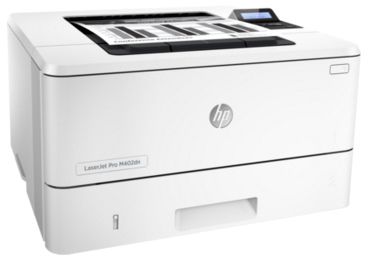
HP 402
Fast printing. Strong protection
• Grab pages and go—without waiting around. This printer wakes up and prints faster than
the competition.1
• Breeze through multipage documents with two-sided printing that’s faster than the
competition.1
• Keep printing safe—from boot up to shutdown—with embedded features like LDAP
authentication.
More pages, performance, and protection
• Get the most prints for your money—with Original HP High Yield Black Toner cartridges
with JetIntelligence.2
• Count on consistent results at high speeds with precision black toner.
• Help ensure you’re getting the authentic HP quality you paid for with innovative
anti-fraud technology.
• Speed through print jobs right out of the box, using preinstalled toner cartridges. Replace
them with optional high-yield cartridges.
Save energy and easily manage tasks
• Help save energy with HP Auto-On/Auto-Off Technology.3
• Print using less energy than competitors—enhanced by Original HP Toner cartridges
with JetIntelligence.4
• Make the most of your office space, with a printer that conveniently fts right into your
work style.
• Easily manage devices and settings using HP Web Jetadmin with a suite of essential
management features.5
Stay connected with easy mobile printing options
• Easily print from a variety of smartphones and tablets—generally no setup or apps required.6
• Easily access, print, and share resources with Ethernet and wireless networking.7
• Count on wireless direct printing in the office—from mobile devices—without accessing
the company network.8
• Help workers print with just a touch of their NFC-enabled mobile device to the printer—no
network needed.9
1 Based on HP internal testing of top three leading competitors’ frst page out from sleep mode and duplex print speed completed 8/2015.
Subject to device settings. Actual results may vary. For details see hp.com/go/Ljclaims 2 Based on cartridge yields for HP 80X compared with
HP 26X Original HP LaserJet Toner Cartridges. For more information, see hp.com/go/learnaboutsupplies 3 HP Auto-On/Auto-Off Technology
capabilities subject to printer and settings; May require a frmware upgrade. 4 Based on HP testing using the ENERGY STAR® program’s Typical
Electricity Consumption (TEC) method or as reported in energystar.gov of top three leading competitors as of 8/2015. Actual results may vary.
For details see hp.com/go/Ljclaims 5 HP Web Jetadmin is free and available for download at hp.com/go/webjetadmin 6 Wireless operations
are compatible with 2.4 GHz operations only. App or software and HP ePrint account registration may also be required. Some features require
purchase of an optional accessory. Learn more at hp.com/go/mobileprinting 7 Wireless performance is dependent on physical environment
and distance from access point, and may be limited during active VPN connections. 8 Feature is supported on the HP LaserJet Pro M402dw only.
Mobile device needs to be connected directly to the WiFi network of a wireless direct-capable MFP or printer prior to printing. Depending on
mobile device, an app or driver may also be required. Learn more at hp.com/go/businessmobileprinting 9 Feature is supported on the
HP LaserJet Pro M402dw only. Requires a compatible NFC-printing-enabled mobile device. For a list of compatible NFC-printing-enabled
mobile devices, see hp.com/go/nfcprinting


Reviews
There are no reviews yet.